
- Guaranteed spot: Your place for future course dates on the same level, same day and at the same time is guaranteed.
- No booking hassle: You no longer need to register or book manually, so you cannot forget to make a booking.
- Convenience: You can focus entirely on swimming without having to worry about the organization.
Cancellation period: The subscription must be cancelled 6 weeks before the start of the new course session for the cancellation to take effect for the following session.
How to cancel:
- Via the link in the notification email OR
- On the website: Log in >> Customer Account >> Subscriptions >> red button
- As soon as your child exceeds the age limit for the current course level, they will automatically be removed from the subscription for that level.
- You will be informed by email that your child can no longer be automatically registered for the next session of that level.
- We will then offer you a place in a higher course level and adjust the subscription accordingly.
In our booking system, you can book a course for any number of participants.
Simply add the desired number of participants in the third step of the booking process.
If you already have a customer account with us and have previously booked one or more courses, all participants you have previously booked will also be displayed in the third step. If you do not want any of them to be registered for the new course, simply remove all unwanted participants using the “Remove participant” button and/or add new ones.
Too complicated? Contact us. We are happy to help you with your booking!
Yes, as long as the course is still available for booking, you can join at a later date. :)
The course price will already be shown at a reduced rate.
If you are unsure which course would be suitable for you and your child, feel free to contact us via our contact form.
We are constantly planning new courses and publish them online as soon as possible. Usually, new courses become visible on our website 5–7 weeks before the course starts.
The days and times are expected to remain the same, so if you are interested in a course, you can already plan accordingly. The new course session usually starts immediately after the current session and consists of approximately 8–10 classes.
If you would like to be notified as soon as the new courses are online and available for booking, activate the Info Agent for your selected course level.
At the moment, we only have waiting lists for some courses where it is realistic that a place may become available. (If this option is active, you will see it directly next to the course price.)
The principle is “First come, first swim.”
To be notified about new courses, please activate the Info Agent for your desired course category.
- Info-Agent - Baby 1 Anfänger (3-6 Monate)
- Info-Agent - Baby 2 Fortgeschrittene (7-16 Monate)
- Info-Agent - Bambini 1 (ab 1 Jahr)
- Info-Agent - Bambini 2 (ab 2 Jahre)
- Info-Agent - Schwimmvorbereitung (ab 3 Jahre)
- Info-Agent - Schwimmenlernen bis Seepferdchen
- Info-Agent - Schwimmtraining Seepferdchen + Pirat
Unfortunately, you can only enter the swimming pool with a booked course appointment.
However, you can take a look at our Instagram page or view the photos on our website.
Please note that the photos on the website are somewhat outdated. The swimming pool has since been decorated with a bit more color.
You do not need to register as the “1st accompanying person.” :)
If you would like to bring a second accompanying person to the course, you can book an Add-On ticket.
Here is the link: Add-On – Parent & Child Courses
1. Log in to your account.
2. Click on the menu item “Courses” and then “Add-On – Parent & Child Courses.”
3. Select the correct course type:
- 2. Begleitperson zum Babyschwimmen Anfänger (Baby 1)
- 2. Begleitperson Babyschwimmen 2 Fortgeschrittene (Baby 2)
- 2. Begleitperson - Bambinischwimmen 1
- 2. Begleitperson - Bambinischwimmen 2
- 2. Begleitperson - Schwimmvorbereitung
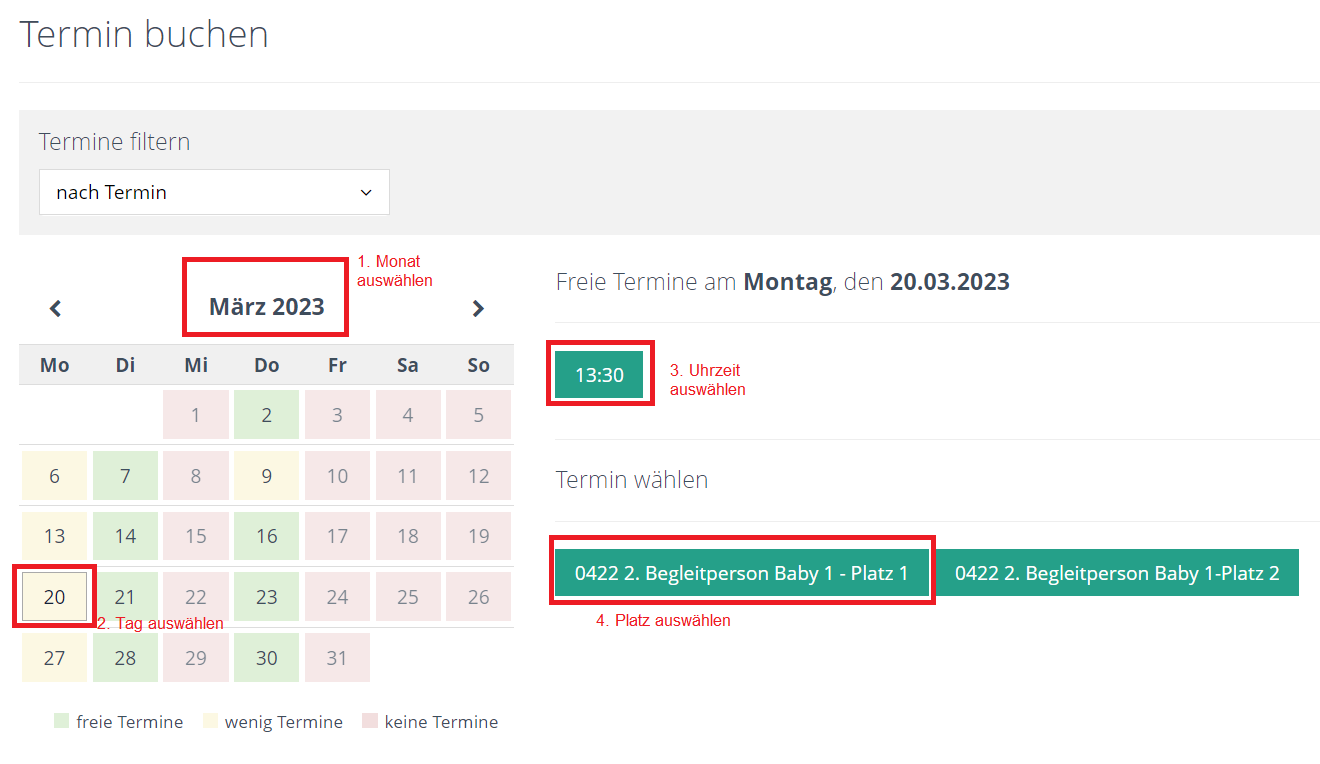
4. Select the correct date and time:
- Month
- Day
- Correct time
- Available spot
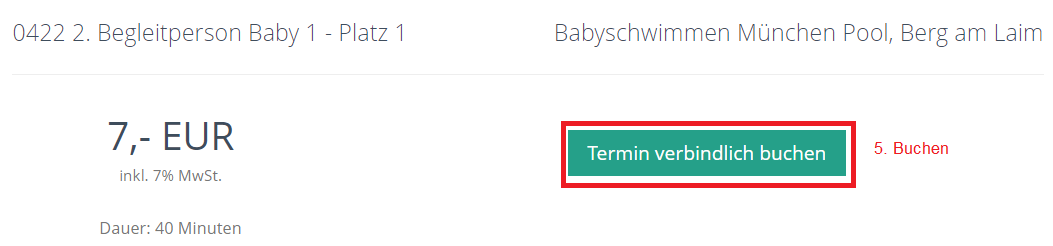
5. Book the session bindingly.
If you no longer see an available session, all spots for the selected day and time are probably already booked.
If you have any questions, please feel free to contact us via the contact form.
Family Training is a special session for families who would like to enjoy the water together. The price is per family (two adults + their own children).
Only one participant needs to be registered, preferably the child who is also enrolled in one of our courses.
It is a self-organized practice without organized instruction, but with toys, mats, and swimming aids that you can use and enjoy for one hour according to your preferences.
Parents are responsible for supervising their children throughout the entire facility!
You can activate the Info Agent for each course level (e.g. separately for Baby 1 and Baby 2, etc.). The Info Agent will notify you when a new course in your selected course category becomes available online and can be booked.
- Info-Agent - Baby 1 Anfänger (3-6 Monate)
- Info-Agent - Baby 2 Fortgeschrittene (7-16 Monate)
- Info-Agent - Bambini 1 (ab 1 Jahr)
- Info-Agent - Bambini 2 (ab 2 Jahre)
- Info-Agent - Schwimmvorbereitung (ab 3 Jahre)
- Info-Agent - Schwimmenlernen bis Seepferdchen
- Info-Agent - Schwimmtraining Seepferdchen + Pirat
You can deactivate the Info Agent at any time. Please note that you may not receive a confirmation email when deactivating it.
- Log in to your account.
- Click on the “Insurance” menu item.
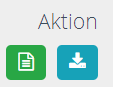
- Under “Action,” you can download your insurance certificate for the selected course (blue button).
- Please submit the insurance certificate and the medical certificate to the insurance provider. You can find the provider’s contact details in your insurance policy.
You can add insurance during the final step of the booking process.
Based on our experience, we recommend choosing this option.
If you forgot to add the insurance but the course has not started yet, you can contact us and we can still add the insurance to your booking. Please contact us via the contact form with the subject line “Course Insurance.”
If you purchased additional insurance when booking the course, you will see an option to report an illness-related absence for each individual course session.
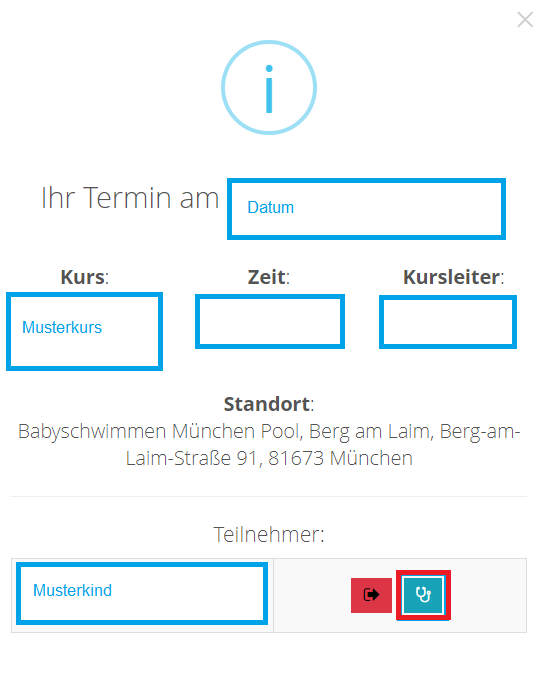
If you do not see the blue button even though you have insurance, please contact us via the contact form.
For information on how to claim a refund of the course fee, please see the other FAQ sections.
If you did not purchase course insurance, you can still check out of the course session (see the FAQ section Tausch- bzw. Nachholtermin“) and hope that a free replacement session becomes available.
- Unfortunately, there is no entitlement to a replacement for a missed course session.
- You are welcome to arrange a replacement session at any time up until the last course session of the current course period.
Please read the information and terms and conditions regarding replacement sessions.
Our courses are held in German, however till now it was no problem for parents, who only spoke little or no German at all, to attend and follow our instructions.
We always show the exercises with a doll or a real baby, therefore it is easy to have the full water experience. If something would not be clear, we or some helpful parents in the group are always happy to repeat the instructions in English.
Join our water family and let's swim through the language barriers together!
You can find all the important information about swimwear and swim diapers in the following document: Swimwear Know-How (German)
The Seepferdchen test can be taken as part of our swimming lessons.
However, we do not want to put unnecessary pressure on the children, so we assess each child individually and sometimes decide spontaneously during the lesson. As instructors, we want to be sure that the child can comfortably meet all the requirements.
For some children, it may therefore be advisable to extend the course and continue practicing for a little longer.
After drying off, we collect lost property in two drawers in the entrance area.
If you have left any valuables at the swimming pool, please send us a message via the contact form with the subject “Lost and Found”, as we always keep valuables locked in the office or in a locker.
The lost-property drawers in the entrance area are usually emptied after 3–4 weeks, except for items that were found more recently.
You can find the door entry code...
- ...either in your customer account, under Overview → Show QR code (yellow button).
- ...Or in the reminder email you receive the day before the course session. (Please also check your spam folder.)
The code is only visible on the day of the course!
- You can cancel your attendance for a course session up to 3 hours before the session starts.
- You can cancel your attendance as often as you like.
- You can book a replacement session until the end of the current course period. After that, the system automatically deletes any outstanding replacement slots.
- Unfortunately, we cannot guarantee that you will be able to find a replacement session.
- Keep checking manually for available replacement sessions in your account under “Open Sessions” (yellow button).
- Activate email notifications for available sessions under Settings (blue button).
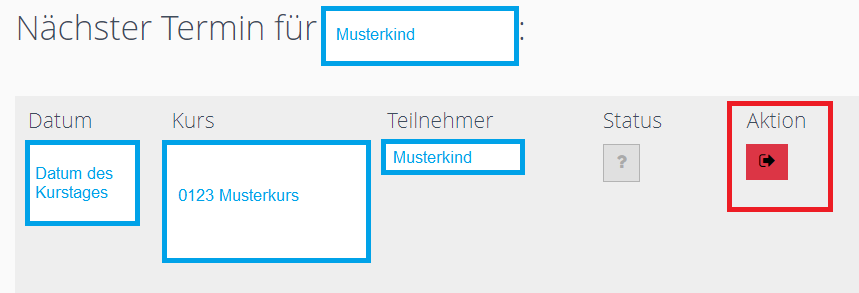
1b. If you would like to cancel your attendance for a later course session because, for example, you already have holiday plans:
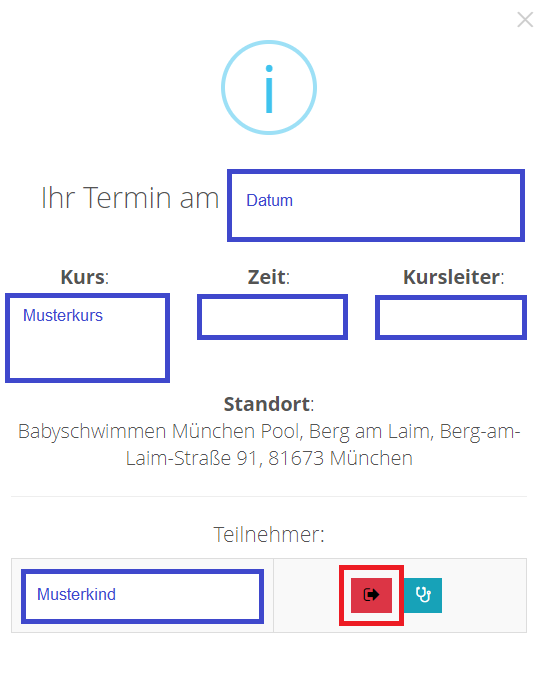
- Click on “Appointments.”
- Select the course session you want to cancel in the calendar.
- Click the red button.
2. We recommend activating email notifications so that you are automatically informed when available course sessions become available for a replacement.
To book a replacement session, you must first cancel your attendance for one of your scheduled course sessions. (See the FAQ section above: “How can I cancel my attendance for a course session?”)
Important information about replacement sessions:
- You can cancel your attendance up to 3 hours before the session starts.
- You can cancel your attendance as often as you like.
- You can book a replacement session until the end of the current course period. After that, the system automatically deletes any outstanding sessions.
- Unfortunately, we cannot guarantee that you will be able to find a replacement session.
After cancelling your attendance, you have two options:
- Keep checking manually for available sessions in your customer account under “Nachholtermine” → yellow button.
- Activate email notifications for available sessions under “Nachholtermine” → blue button.

If you see an available session, you can register for it directly in your customer account with one click. :)
If something isn’t working or the process seems too complicated, feel free to contact us via the contact form!
Unfortunately, there is no entitlement to a replacement for a missed course session.
However, you are welcome to try to arrange a replacement session through our anonymous replacement-session exchange.
Another family may cancel their attendance for a course session, making the spot available for you to book. This works in most cases, especially if you are flexible with your schedule.
The option to arrange a replacement session expires on the last day of the current course period, and the system automatically deletes any remaining available sessions.
If you would like to know more, please read the information and terms and conditions regarding replacement sessions.